The Mower Math how-to guide
Everything below uses made-up addresses and numbers. Your screen will show your own company name, your real costs, and the actual lawns you measure. Use the search box up top to jump straight to what you need.
1 · What Mower Math does
Type an address, and Mower Math measures the mowable lawn from the sky, prices the visit from your costs, and hands you a branded PDF estimate — then lists every neighbor within half a mile so your next customer is next door. No driving out to measure.
2 · Set up your business FIRST TIME
The first time you sign in, a two-minute wizard asks plain-English questions so every price is yours. You can redo it any time — menu ☰ → ⚙️ Settings, or replay the tour.
- Your company name & contact — goes on every estimate. (e.g. “Evergreen Lawn Co.”)
- Your business address & phone — so customers see you’re local.
- Where your day starts — usually your shop or home; drive time is figured from here.
- Crew size — how many people mow together, counting you.
- How fast you mow — start at 6,500 sq ft/hour, or tap your mower type.
- Your costs & margin — pay rate, fuel, equipment, minimum charge, profit %.
3 · Set your pricing
The most accurate way to price is to calibrate against a lawn you already service and know the price of. Nudge your assumptions until the quote matches — then those numbers price every future job.
Search that lawn
Type its address and tap Measure. Mower Math measures the lawn and shows a price from your current numbers.

Match your real price
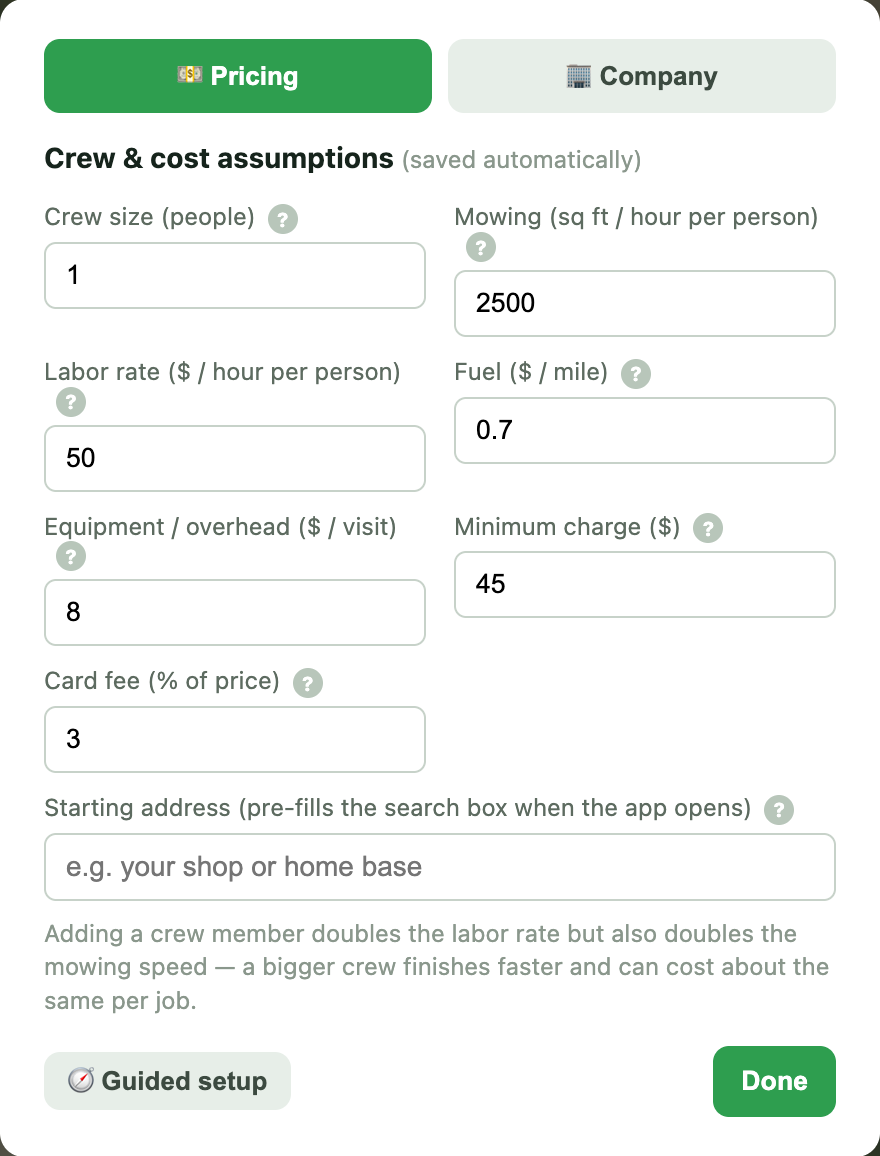
Open ⚙️ Assumptions and nudge your crew, mowing pace, labor rate and margin until the quoted price lands on what you actually charge. They save as you type.
Check your profit & margin
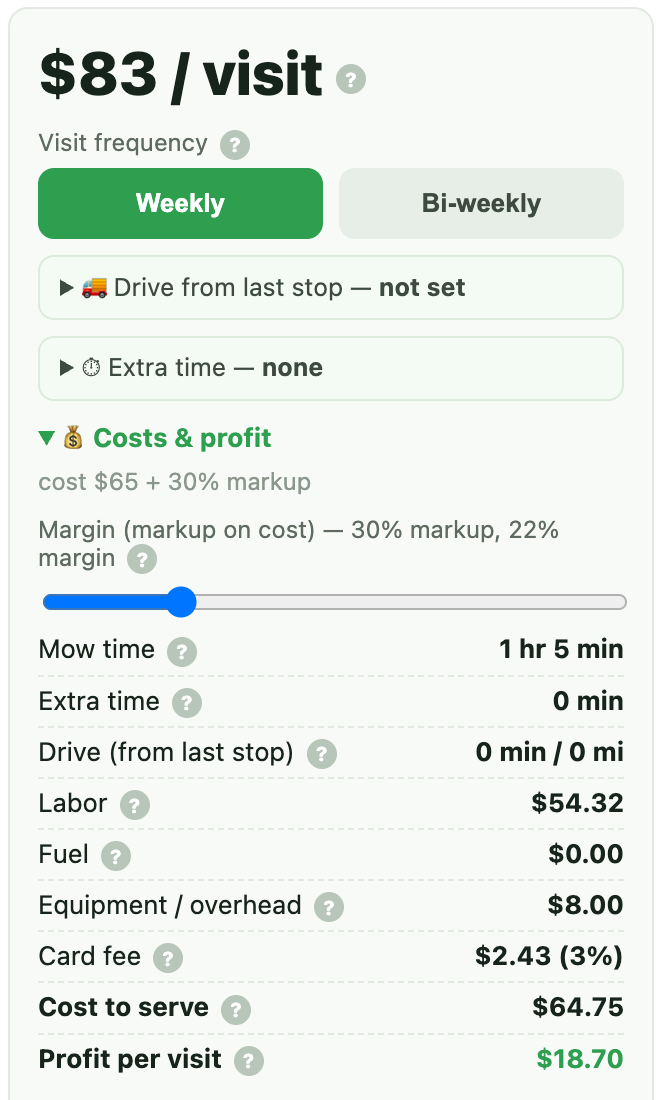
Open Costs & profit on the price card. It shows your cost to serve and profit per visit. If the profit looks healthy at a price you know wins the job, your numbers are dialed in.
These become your defaults for every quote
Assumptions are global. Whether you edit them from a quote’s ⚙️ Assumptions or from ☰ → ⚙️ Settings, it’s the same place — the change applies to all future quotes. They save as you type; there’s no separate “apply” step.
What each number means
4 · Quote a lawn
The core move. One address in, a customer-ready estimate out.
- Type the property address and tap Measure.
- Mower Math finds the lot and shades the mowable lawn green on the map.
- Read the price per visit. Adjust the margin slider or any per-visit knob if you like.
- The quote auto-saves — “✓ Saved automatically” shows at the top. No Save button.
- Tap 📄 Export estimate, enter the customer’s name, and pick how to send it — download, view, email, or a secure link (Section 5).
5 · Send the quote — email, secure link & open alerts
One dialog, four ways to deliver — pick any combination with the checkboxes.
- ⬇️ Download the PDF — the classic branded estimate, ready to print or attach.
- 👁️ View it in a new tab — look it over before anything leaves the shop.
- 📧 Email it to the customer — sent from your business name with the PDF attached, and a copy lands in your inbox.
- 🔗 Secure link — a private link you can text or paste anywhere. The moment your customer opens it, we email you an alert — “👀 Quote opened!” — so you can follow up while they're still looking at your price.
6 · Draw a lawn by hand
When a lot is heavily shaded, brand-new construction, or outside the auto-measure area, Mower Math hands you a tracing tool instead of guessing. Works anywhere.
- If auto-measure can’t read the lawn, it drops a pin and says “Trace the lawn.” Or tap ✏️ Draw manually any time.
- Tap the corners of the grass on the map; tap your first point again to close the shape.
- Add as many sections as you need — front, back, side strips. Overlaps only count once.
- The square footage and price appear just like an auto measure.
7 · Find the neighbors (prospecting)
You’re already parked there — so quote the whole block. After you measure any property, one tap lists every address within half a mile.
- Quote a property (Section 4).
- Tap 🏘️ Find neighbors within ½ mile.
- Every address drops a pin on the map and fills the list, nearest first.
- Use the 🔍 filter to narrow to one street.
- Tap 📄 Export list (PDF) for a printable prospect sheet with checkboxes.
0.04 miquote →
0.05 miquote →
0.06 miquote →
8 · The door-hanger route PRO
The big one. You win a job, then walk the neighbors a few days later leaving door hangers — each with a real price you quoted from your desk first. Here’s the whole loop.
- Quote the job you won, tap 🏘️ Find neighbors, then 💾 Save this list and name it (e.g. “Oakhurst — Tuesday”).
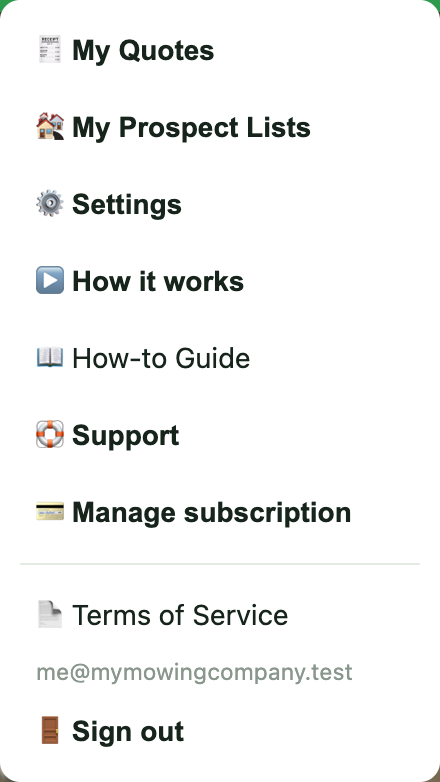
- Any time later: menu ☰ → 🏘️ My Prospect Lists → open the saved list.
- Tap quote → on the first address. It measures and prices instantly.
- Tweak the price if you want. It auto-saves — “✓ Saved automatically — $52” shows up top.
- Tap ← Back to list. That address now shows ✓ $52. Do the next one.
- When the street is done, tap 📄 Export list (PDF) — the sheet now has a Quoted $ column.
- Print it, walk the block, and write each price on that home’s door hanger.
0.04 mi✓ $52
0.05 mi✓ $48
0.06 miquote →
| Address | Distance | Quoted $ | Notes | |
|---|---|---|---|---|
| 22 Oakhurst Dr, Springfield, IL | 0.04 mi | $52 | ||
| 24 Oakhurst Dr, Springfield, IL | 0.05 mi | $48 | ||
| 26 Oakhurst Dr, Springfield, IL | 0.06 mi |
9 · Save & reopen prospect lists PRO
A saved list is a neighborhood you can come back to. Reopen it to keep quoting where you left off.
- After finding neighbors, tap 💾 Save this list and give it a name.
- Open the menu ☰ → 🏘️ My Prospect Lists to see all your saved lists.
- Tap open → to load a list back onto the map, with your quoted prices already marked.
- Tap ✕ to delete a list you’re done with.
10 · Recall past quotes
Every quote you make is saved for 90 days. Find it, reopen it, adjust it, re-send it.
- Open the menu ☰ → 🧾 My Quotes.
- Search by customer name, address, or estimate number.
- Sort (newest, price, lawn size) or filter (auto/drawn, weekly/bi-weekly, exported).
- Tap a quote to view it, then ✏️ Reopen & adjust to load it back and change the price live.
- Re-export the PDF any time — reopening never uses up a free quote.
1428 Meadow Lane · KDQPX-40317$58
drawn · JDXMS-87967$52
11 · Per-visit adjustments
Some things change for one job but not your defaults. These live on the price card and only affect the quote you’re looking at.
12 · Free vs Pro
Start free, upgrade when the quotes are flowing.